
Also Interesting
If You Frequently Travel, A Second Phone Number Can Be A Cost Effective Solution

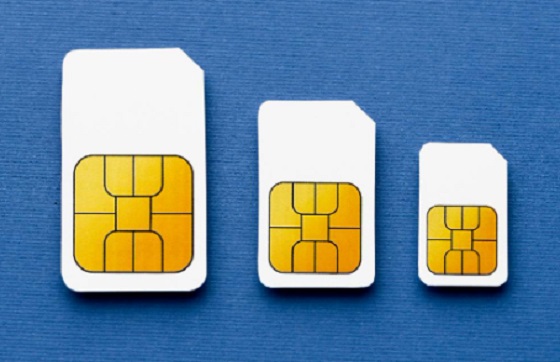

Advances in transport technology have reduced not only travel times but also costs. Airlines and tour companies offer a wide array of cut-price deals, so if you already have a destination in mind, sign up for email alerts. Today, you can fly from Canada to Europe in around 6 hours, whereas decades ago, the same journey took weeks by boat. Maybe you travel to represent your organization for work-related purposes. In that case, you get to combine business and leisure, so you’ll return to the office refreshed and ready to be productive.
Suppose you’re an international traveler, a savvy vacationer, or even a local adventurer. In that case, you know a few trips make your trip easier: a passport, comfy shoes, and a six-port USB charger. And it doesn’t take long to realize there’s one thing you’ve forgotten. You need an eSIM Canada for enhanced privacy protection, streamlined communications, and the ability to avoid expensive roaming charges. You probably have an expensive Android or iPhone device, so the last thing you want is another handset. There are many ways to add an extra phone number that works with your smartphone.
Get And Setup An eSIM, Which Works Like A Physical SIM Card
eSIM technology offers a seamless, more integrated approach to connectivity, so it’s a progress from traditional SIM cards. By enabling the eSIM profile, you get access to the operator’s network, which is optimized for local access and helps avoid potential roaming restrictions. This level of resiliency is convenient for specific use cases, such as Google Maps, that require automatic initial connectivity. I you’re traveling, it’s recommended to install the eSIM a couple of hours before your trip or once you’ve reached your destination. The validity period starts counting. You’ll need a WiFi or data connection to set up the eSIM on your device.
You can manually activate the eSIM by pasting the installation code (and any other required information) if you don’t have another device to scan. You should activate the eSIM as soon as you arrive at our destination to prevent your mobile phone data from being used. Activating roaming or data roaming from your device will activate the plan. You can install the eSIM by scanning the QR code you received from the provider: open the built-in camera app, point the camera at the QR code, and tap the banner that appears on your phone. Label the eSIM and set your preferences for calls, messages, and data.
Not Only Do You Get To Keep Your Phone, But You Can Also Add A New Number
An additional phone number allows you to distinguish between personal and professional calls and messages, fostering a healthier work-life balance, and adds another layer of anonymity when interacting with strangers. Work, friends, family, and dating contacts are entirely separate. Texting is unlimited, calling works with your carrier within minutes, and voicemail is easy to customize. You can talk and text using any phone number at any time. The second line might be a disposable or semipermanent number. When traveling overseas, you’ll need to provide your phone number to hotels, bicycle-sharing services, and so on.
Having a phone that works just like it does back home when traveling abroad is the best thing you can do to reduce stress. Being able to keep in touch with family and friends, using Google Translate, and having access to booking sites in the event of delays are just some of the reasons why Internet access is indispensable. Get a full-featured number that supports limitless Internet so you can use apps like WhatsApp, Facebook Messenger, or Skype. It’s not a good idea to use image-heavy social media apps like Snapchat or Instagram.
How To Get The Best Performance Out Of Your Esim When Traveling
Some smartphones have both a removable SIM card and an eSIM card, which allow users to have two separate numbers – i.e., a personal number and a work number – on one device. After establishing a connection to a mobile network, your eSIM will be functional and ready for immediate use. Using a local mobile network while overseas is more affordable than paying roaming costs to your home network; should you mistakenly erase your eSIM, you must reach out to your provider and ask for another installation code. Some device manufacturers offer instructions on how to use plans from two different providers.

In what follows, we’ll present our favorite tips on how to make the most of your eSIM when traveling abroad:
● Strategically plan your data usage: Review your plan details before jetting off. Understanding what your eSIM package includes will help you prepare for your trip and stay connected while miles away.
● Give your eSIM a custom name: During the eSIM installation, you can label your new SIM. For instance, you can name the eSIM “Travel” or “Canada eSIM” and your existing physical SIM “Personal”. If you change your mind, you can edit them at any time.
● Turn on push notifications: You can turn on push notifications to be informed if data is running low or your eSIM is about to expire. You can stay focused without constant interruptions.
In Closing
If you’re traveling internationally, having a second phone number can offer several advantages, such as security, privacy, and convenience. It can be used for bookings, online registrations, and transactions, therefore minimizing the risk of your primary number being exposed to scams and other types of cyberattacks. You can install one or more eSIMs on your device and have two phone numbers at the same time. Remember, the service provider has control over the subscription and is required to maintain an adequate phone signal.
The eSIM plan will automatically expire once you’ve used up your data or when your purchased days run out. You can add more days to your existing plan by reloading your eSIM: simply log into your account and choose the eSIM you wish to extend so you don’t have to worry about connectivity interruptions. This is ideal for short or even long-term travelers.


The Toronto Blue Jays are certainly keeping things interesting this winter. While the calendar might say late December, the front office shows no signs of slowing down. They have already made waves across MLB with some massive acquisitions earlier in the month.
Rather than packing it in for the holidays, the management team is seemingly working overtime. Their goal is to build a roster that can truly compete for a championship in 2026.
Although there are no more signing announcements for the end of the year, the silence is likely temporary. Reports indicate that the team is actively pursuing several more roster improvements before the new year begins.
A Rotation Built To Dominate
The team made their intentions clear in early December. They successfully signed Dylan Cease to a massive seven-year, $210 million contract. This deal, which became official around December 8, instantly transforms the Toronto rotation into one of the strongest in MLB.
Moreover, they did not stop with just one big arm. The front office added significant depth by bringing in KBO MVP Cody Ponce on a three-year deal worth $30 million. This gives the team a level of stability that was missing in previous seasons.
With such dramatic changes to the roster, fans might be looking for a clear overview of licensed Ontario sportsbooks to understand how these moves have impacted the team’s championship odds. It is certainly a different looking team than the one that ended the last season.
Targets for the Bullpen and Lineup
It seems that the focus has now shifted from the starting rotation to other needs. Agents around the league note that the Jays remain “everywhere” in trade talks. The priority is now on finding high-leverage arms and position players to round out the squad.
The front office is reportedly looking at several specific targets:
- Robert Suarez is a primary target to help lock down the late innings.
- Luke Weaver is being considered to add veteran versatility to the staff.
- Depth pieces for the lineup are being sought to support the core hitters.
- Internal extensions remain a key part of the winter strategy.
Due to the heavy spending on Cease and Ponce, these next moves will likely be strategic. The team is looking for the right fit to complement their new stars.
The Future of the Infield and Management
Conversations are actively continuing with free agent Bo Bichette. Bringing him back is a major topic of discussion among the fanbase, even if no deal is imminent yet. Furthermore, the team has been linked to prospect Kyle Tucker, suggesting they are keeping an eye on the future as well as the present.
Manager John Schneider has also expressed optimism regarding his own contract extension. However, he made it clear that building the team comes first. Therefore, while the heavy lifting might seem done, the work continues behind the scenes.
To be sure, the MLB offseason is long. But the Toronto Blue Jays have started fast, and they seem determined to finish strong.

We wanted to know what to do if you came to Canada for temporary or permanent residence. Many Ukrainians have arrived in the country, and many don’t know where to begin their financial journey. People often turn to traditional banks, where they encounter problems due to a lack of language skills and basic understanding of Canadian financial processes. We found an alternative – a credit union in Toronto. Today, we’ll look at one of the most well-known and learn more about what they have to offer Ukrainians.
What is a Credit Union in Toronto
These organisations differ from the typical bank for Ukrainians. They offer more flexible conditions, convenient online management, and a personalised approach.
However, these organisations are just as safe and reliable as banks. Let’s look at reliability using the example of the well-known BCU Financial:
- With over 70 years on the market. This credit union in Toronto has a dedicated client base with decades of experience.
- Extensive experience. Indeed, over more than 7 decades, its specialists have become experts in financial matters.
- Branches available. You can visit the office for face-to-face interaction.
- Active in the social life of the Ukrainian community. Buduchnist Credit Union provides financial support to schools, churches, and communication centres for Ukrainian newcomers.
As you can see, such companies have stability and experience. Now let’s look at how they differ from banks in financial matters.
Ukrainian Credit Union Toronto: Differences from a Traditional Bank
Firstly, such organizations welcome a personalized approach to Ukrainians. They are more flexible when it comes to obtaining a loan. Newcomers in Canada are working on receiving a good credit history. Banks always request one when reviewing a loan application.
Secondly, you can receive advice in your native language. Most Canadian banks don’t have multilingual consultants and respond only to inquiries in English or French. If, for example, you need help with a scholarship card, you’ll have to call a translator.
Third, you’ll get more flexible and understated banking for Ukrainians. It includes the ability to submit an app online. It provides such services as ordering credit cards, applying for a loan, or opening an account.
Conclusions
Credit unions are much easier for Ukrainians to work with. They speak your language, can provide advice on finances and their specific needs in Canada, and offer flexible terms. They also provide full-fledged online banking, so familiar to Ukrainians. You also become part of the community because, as a credit union member, you are, to a certain extent, its co-owner.

Georgia county admits illegally certifying 315k ballots in 2020 presidential election

Alberta Next Panel calls to reform how Canada works

Canadian government launches trial version of digital ID for certain licenses, permits

End Supply Management—For the Sake of Canadian Consumers
-
International17 hours ago
Georgia county admits illegally certifying 315k ballots in 2020 presidential election
-
 Business2 days ago
ICYMI: Largest fraud in US history? Independent Journalist visits numerous daycare centres with no children, revealing massive scam
-
 Alberta1 day ago
Alberta project would be “the biggest carbon capture and storage project in the world”
-
 Energy1 day ago
Canada’s debate on energy levelled up in 2025
-
 Haultain Research19 hours ago
Sweden Fixed What Canada Won’t Even Name
-
 Business18 hours ago
What Do Loyalty Rewards Programs Cost Us?
-
 Business1 day ago
Socialism vs. Capitalism
-
 Energy1 day ago
New Poll Shows Ontarians See Oil & Gas as Key to Jobs, Economy, and Trade